

Twitch streams are packed with exciting gameplay, creative insight, and live moments that aren’t always easy to revisit once they expire. 4K Video Downloader+ offers a simple and reliable way to save Twitch streams directly to your device so you can watch them offline when it is convenient for you. We wanted to share a simple guide about what 4K Video Downloader+ is and how to use it to download streams from Twitch.
What is 4K Video Downloader+?
4K Video Downloader+ is an easy-to-use, cross‑platform program designed to download videos, audio, and subtitles from a wide range of online platforms. It supports downloads from YouTube, Vimeo, TikTok, SoundCloud, Facebook, Twitch, Bilibili, Dailymotion, Niconico, Flickr, Likee, Tumblr, and others. It allows users to save videos in HD 720p, Full HD 1080p, 4K, and 8K, making it suitable for viewing on HD TVs, iPads, iPhones, Samsung devices, and more.
The app also includes advanced features such as downloading YouTube annotations and subtitles in SRT format in more than 50 languages, plus it has support for playlists, channels, Shorts, Gaming, Kids, and YouTube Premium content you have access to. 4K Video Downloader+ can also download multi‑language audio tracks, which is useful for platforms that offer alternate commentary or language options.
4K Video Downloader+ includes a built‑in browser, allowing you to search and download videos and audio without leaving the app. This includes access to private content when logged in, and it makes browsing Twitch VODs directly within the application especially convenient.
A feature dedicated to saving users time is Smart Mode, which lets you preset your preferred download settings — such as format, quality, and content type. Once enabled, the application automatically applies these settings to every new link, making the process faster and more consistent, particularly if you frequently download Twitch streams in the same resolution or format.
What is even better is that the free version of 4K Video Downloader+ includes all essential features, making it accessible for most users. It is compatible with Windows 11 64‑bit and earlier, macOS 12 and later, and Ubuntu 22.04 64‑bit (GNOME).
Now that we know what 4K Video Downloader+ is all about, let’s dive into how to use it!
How to Download Streams from Twitch Using 4K Video Downloader+
4K Video Downloader+ aims to make downloading streams from Twitch easy and intuitive. Just follow these five easy steps:
1. Open 4K Video Downloader+
Launch the application on your Windows, macOS, or Linux device.
2. Copy the Twitch Stream URL

Go to Twitch and copy the link of the finished broadcast, VOD, or highlight you want to download. Live streams cannot be downloaded — only completed broadcasts.
3. Click “Paste Link”

Return to 4K Video Downloader+ and select Paste Link. The app will analyze the Twitch URL and prepare it for download.
4. Choose Format, Quality, and Output Folder

Select your preferred video format and resolution. If Smart Mode is enabled, your preset settings will be applied automatically.
5. Start the Download
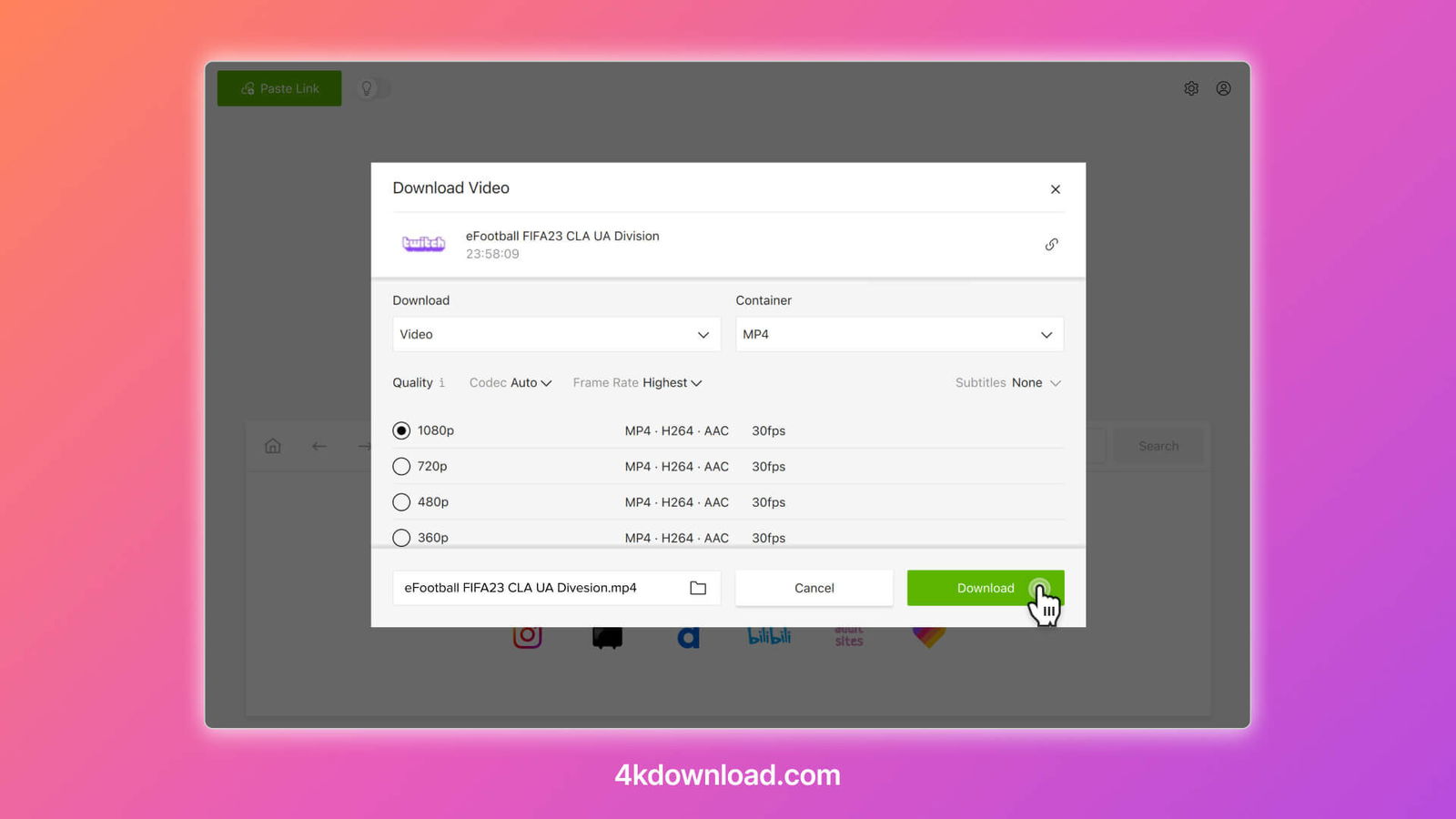
Click Download to save the Twitch stream to your device.
Optional: Use the Built‑In Browser
The integrated browser allows you to search Twitch directly inside the application and download videos without switching tabs, which is especially helpful when browsing multiple VODs.
It’s that easy!
4K Video Downloader+ provides a fast and reliable way to download Twitch streams for offline viewing. With support for high‑resolution downloads, a built‑in browser, Smart Mode automation, and essential features available even in the free version, it’s a powerful tool for anyone who wants to save broadcasts, revisit gameplay, or keep favourite streams accessible anytime.