Back in the day, the third-party controller was considered the “guest controller.” It usually had a janky size, awkward hand feel and a less attractive design. In 2026, that is no longer the case. Gamers now have access to some of the best controller designs available, often equipped with extra buttons and offering a better feel than the stock option. This is exactly what the ROG Raikiri II Xbox Wireless Controller brings to the table: a stylish and genuinely superior alternative. Like the Japanese legend it is named after, Raikiri translates to “lightning cutter,” and the Raikiri II lives up to that idea. It feels sharp and responsive in your hands, making it an excellent wireless controller.
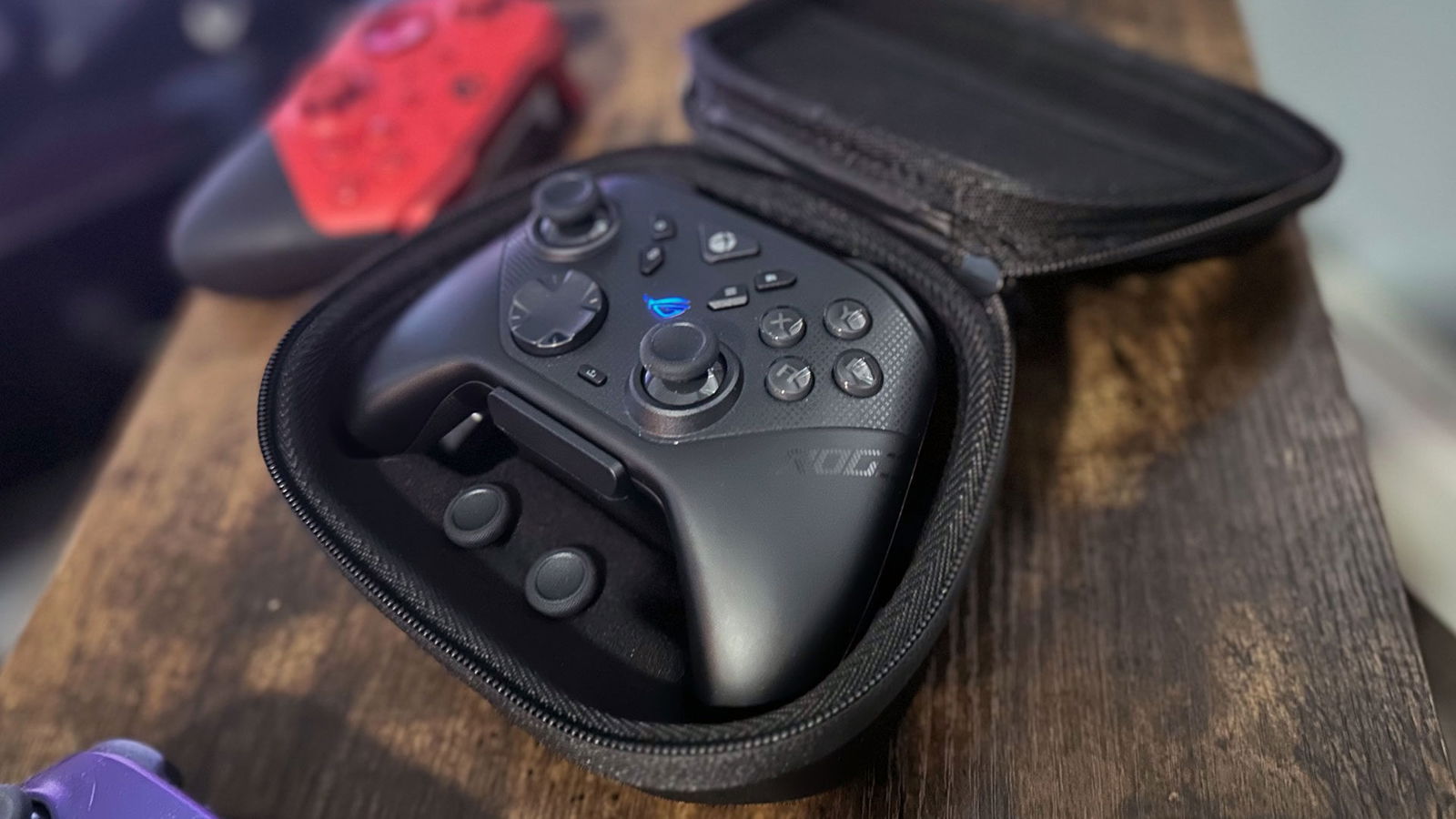
Upon arrival, the ROG Raikiri II comes packaged with a carry case, because every weapon needs a sheath, along with stick replacements, a charging stand that can be removed from the base of the carry case or used while inside it, much like the Xbox Elite Series 2. Also included is a USB Type-C to USB 2.0 cable for charging, along with small foam rings that secure the sticks for safer travel. The controller’s chassis is smooth to the touch and features a matte, anti-streak finish. The face buttons are finished in gloss and make a bold statement.

On the back of the ROG Raikiri II, ROG smartly placed the hair-trigger adjustment sliders in a spot where my fingers almost never land, which is a relief. Normally, with hair-trigger locks on other “pro” controllers, I find myself accidentally disengaging them and ending up with triggers set to random positions. With the Raikiri II, the triggers offer only two settings, and the toggles are rigid, making accidental adjustments far less likely.
“With the Raikiri II, the triggers offer only two settings, and the toggles are rigid, making accidental adjustments far less likely.”
The Raikiri II also provides a larger base for each analogue stick, giving players more freedom of movement on either side of the controller. There is also a noticeable stippled texture on the back for extra grip during the sweatiest firefights. This sidearm is adaptable and ready for any battle.
The switch that toggles the Raikiri II between wireless dongle mode, used for low-latency play, and other connection options also features a rigid design. If players want to adjust the manual settings, they need to do so deliberately, which fits neatly into ROG’s overall design philosophy. The Raikiri II even includes a clever slot that lets the wireless 2.4 GHz dongle be stored inside the controller itself. As someone who regularly loses these tiny dongles, I find this a monumental design choice.

The ROG Raikiri II Xbox Wireless Controller works with Xbox, but it is a multitool beast that can also sync with anything Microsoft calls “an Xbox.” That effectively means nearly any device compatible with Bluetooth, minus the Nintendo Switch. The toggle on the back of the controller lets you switch the Raikiri II between the 2.4 GHz dongle used for Xbox connections and Bluetooth mode, making it easy to pack up and take on the road to play on a tablet or mobile PC.
With the included USB-C cable, low-latency players can also use a wired connection from anywhere in the room without feeling tethered to the console. The cable itself is a staggering three metres long. All three connection modes work exactly as designed.
The Republic of Gamers team also remembered to include a suite of back buttons for gamers who use every finger on the battlefield, often referred to as back paddles. Like the face buttons, these are positioned to match the natural shape of the player’s hands so they sit comfortably under your fingers. Unlike the flimsy, removable back levers found on some competing designs, these feel permanently integrated into the controller and have real heft. Not once did I accidentally hit one of these buttons. Like the rest of the Raikiri II, they operate with deliberate intent, and the back buttons require a firm press to activate.

Under the hood, the internals of the Raikiri II include the kind of high-end features expected from other “pro” controllers. Anti-drift TMR sticks, which are an upgrade over Hall Effect technology, are paired with micro-switch buttons for instant actuation and that satisfying mouse-click sound. On PC, the controller also offers a staggering 1000 Hz polling rate, which drops to 250 Hz on console.
It is worth noting that this polling rate difference could be a deal-breaker for some diehard players. The issue can be solved quickly by using a wired connection to the console. While many users prefer the familiar feel of a traditional button press, the instant actuation and mouse-click feedback are infectious. I never get tired of feeling congratulated for pressing a button.
Where the controller falls noticeably short is its included ASUS Armoury Crate software, which is required to enable the extra macro functions it provides. The software cannot be used directly from an Xbox console, meaning even basic button bindings for the back paddles require a PC with the Armoury Crate app installed. This could have been solved with a mobile app that lets players change settings on the fly, but Armoury Crate currently exists only on PC. I also could not adapt controller functions on my brother’s Mac, meaning Mac users will need to borrow a friend’s PC to make adjustments.


While these limitations are not a deal breaker, it is still a headache having to connect the controller to a PC just to adjust functionality or switch profiles. As a primary Xbox player, getting the stick dead zones dialled in was a noticeable hassle, since I had to move back and forth between the console and PC to fine-tune small settings. This step is especially important for players who are not used to the extra stick movement allowed by the Raikiri II’s larger joystick bases.
Shortcomings aside, stick sensitivity, trigger actuation and even RGB lighting can all be adjusted to tailor the Raikiri II into your own personal weapon of choice using Armoury Crate. That said, it would have been nice to at least change button bindings directly from the Xbox dashboard, similar to what the Xbox Elite Series 2 allows.
In practice, the ROG Raikiri II Xbox Wireless Controller quickly became my sidearm of choice, and it is not even close. The sleek feel of the controller holds up even during the most demanding sessions, and with the built-in grip, the burden of perfection lies squarely with the player.

During an Elden Ring Nightreign Everdark Sovereign run, I was able to hold my own against Libra and Tricephalos regardless of hand perspiration. While running some 2XKO matches online, I felt like I had a genuine edge using the back paddles for parries, and punishing opponents with Yasuo aerial combos just felt right. The +pad on the Raikiri II is clearly built with fighting games in mind and responds well to diagonal inputs.
In a firefight in The First Descendant, I initially thought the extra space in the stick wells might throw off my aim. However, after adjusting sensitivity and dead zones in Armoury Crate, I was able to fine-tune everything and drop waves of enemies during missions with ease. In Halo Infinite Battle Rifle duels, I felt noticeably more accurate than when using a standard controller. My K/D ratio climbed to an average of 1.18 compared with my usual 1.05. For someone who considers themselves an average shooter player, that difference was significant.
After a couple of weeks of heavy use, the ROG Raikiri II Xbox Wireless Controller has become my go-to option for gaming on Xbox and PC, full stop. The controller feels fantastic in the hands and almost feels like it should have moved in ages ago.

The grip on the Raikiri II, combined with back paddles that require deliberate presses and face buttons that deliver a satisfying dopamine hit every time they are tapped, makes the controller an absolute joy to use. The software limitations are frustrating, but once everything is configured on PC, the Raikiri II is sharp enough to cut through any challenge thrown at the player. Xbox players who want their controller to feel just right should look no further than the Raikiri II wireless.