
For the last number of years, I have had the privilege of getting to try out a handful of different gaming laptops and ultrabooks, but my biggest gripe has always been the same — I want to be able to game on the go, without the added size and bulk of a conventional gaming laptop.
This year, ASUS has introduced their new gaming laptop, the TUF Gaming A14, a 14-inch laptop that shrinks a conventional 16-inch laptop into a much smaller form factor, allowing you to bring it on the go while still retaining the conveniences of a smaller laptop, making it potentially the best of both worlds.
Unboxing The ASUS TUF Gaming A14

The unboxing for the ASUS TUF Gaming A14 is a fairly basic experience, containing not too much more than the device itself and its rather average-sized 200W power adapter. Said power adapter uses a proprietary connector, which, while I would prefer to see USB Type-C here, at least saves you from taking up a port you may need while using the laptop itself.
Ports/Design
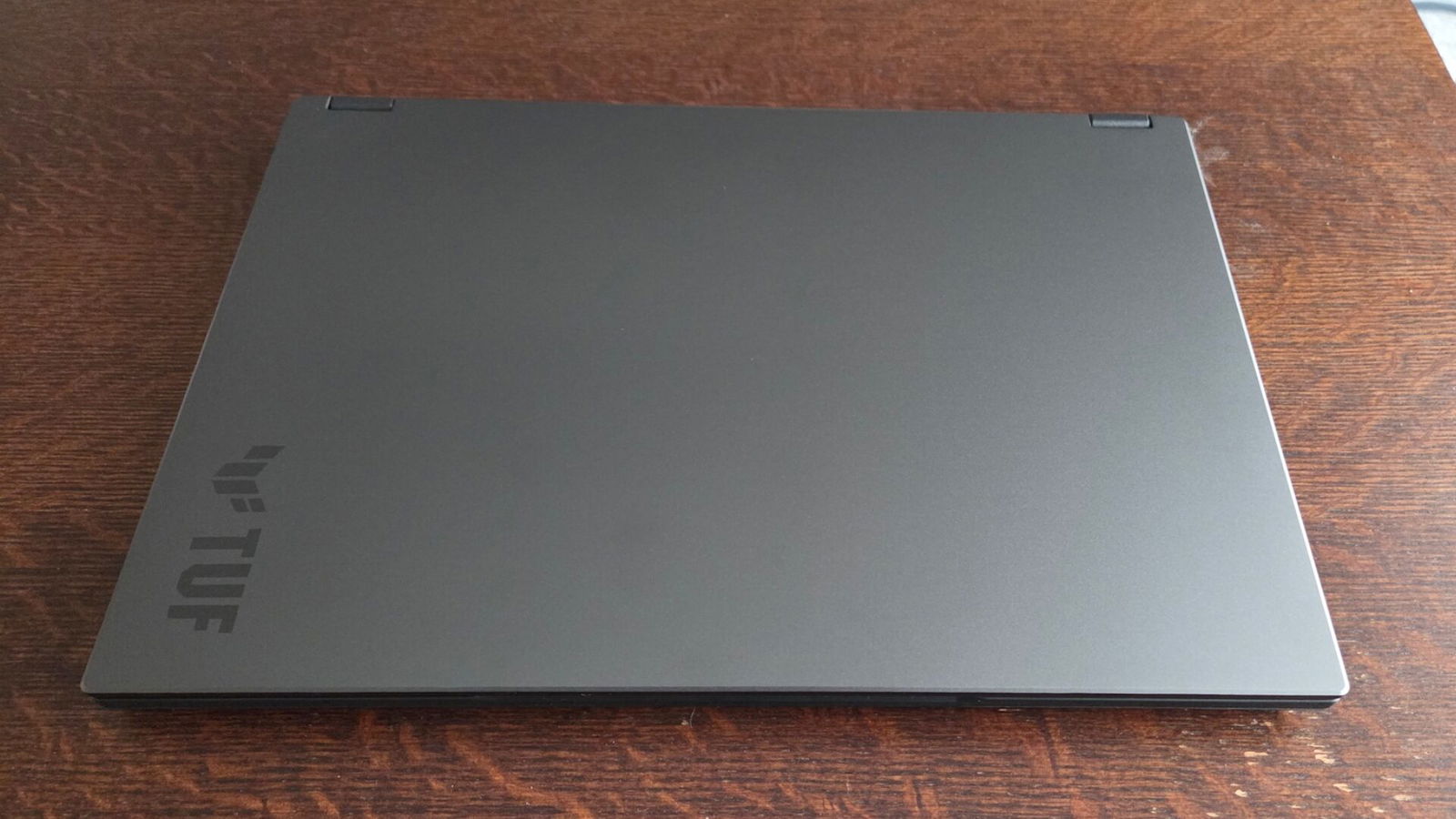
Taking a look at the laptop itself, I was initially quite amazed at just how lightweight ASUS was able to make the TUF Gaming A14. Coming in at only 3.22Lbs(1.46kg), this is lighter than even some of the thin and light ultrabooks I have reviewed over the years, making it a breeze to toss in my bag without worrying about it weighing me down while travelling.
Made of a mix of both aluminum and plastic, the overall build feels sturdy and solid, with minimal flex while typing. The screen hinges allow for a full 180 degrees of movement — something I always appreciate seeing on my laptops.
Taking a look at the ports along the left side, you get the charging port, HDMI 2.1, a USB4 Type C port, a USB 3.2 Gen 2 Type A port and a combo headphone/mic port. Along the right, you find a second USB 3.2 Gen 2 Type A port, a USB 3.2 Type C port and one of my favourites — a MicroSD card slot.
No Ethernet port here, which may disappoint some users; however, I am thrilled to see everything ASUS built into the chassis. It not only gives me every port I personally find myself using on a regular basis, but it also allows me to charge the laptop up with USB Type-C adapters from either side of the laptop, making cable management much easier.
Display

One of the first aspects of the ASUS TUF Gaming A14 that surprised me was its gorgeous 14” display. Offering a resolution of 2.5K, paired with a 165Hz refresh rate, this is something I have typically only seen on much larger devices or higher-end thin and light laptops.
This display offers full sRGB colour accuracy, making colours and games pop and come to life when playing, helping to further immerse you into whatever game or content you are viewing. I was also thankful to see that ASUS has made the display matte instead of glossy, as it prevents sunlight or other external lighting from preventing me from seeing what is on my screen, making it a great choice when on the go.
Audio
Despite only having a dual speaker setup, the ASUS TUF Gaming A14 did a great job of delivering a better-than-average listening experience. While both speakers are downward firing, I found they were well balanced, and the audio sounded true to life and accurate, adding further dimension and depth to my gaming sessions. Powered by Dolby Atmos, listening to music was additionally pleasant, and all tones sounded as I would hope to hear and continued to surprise me with just how well they sounded.
Keyboard/Touchpad
ASUS, in recent years, has done an impressive job by upping their game when it comes to how their keyboards feel on their laptops. This year’s TUF Gaming A14 is no exception, delivering a decent experience, although maybe slightly on the softer side of things. While by no means is this a mushy feeling keyboard, when compared to that of other more premium laptops I have tested, the keyboard felt less tactile. This did, however, make gaming and typing out longer documents a little less fatiguing and still quite comfortable. I had no issues at all ramping up to my normal typing speed when using the TUF Gaming A14, and I quickly felt right at home when using it.
Just above the keyboard are keys for volume control, mic and a launch key for Armoury Crate, something I was very happy to see here. Being able to adjust my volume without having to hit the “FN” key or taking up functionality of the function row keys made controlling my volume while gaming or working on the laptop much easier and prevented any accidental keystrokes while using them, something I have occasionally dealt with on other laptops.

Backlighting was additionally great on the keyboard, offering 3 different degrees of brightness, although I occasionally found myself wishing the lowest brightness was just a tad dimmer for using the laptop in a dark room. You won’t find any flashy RGB lighting here, which, while a bummer to some, was not too big of a deal for me, as it made the ASUS TUF Gaming A14 look more professional in an office setting.
The touchpad on the ASUS TUF Gaming A14 is a traditional diving board style, which was adequately large, making using it seamless and easy. Clicks are soft, yet responsive, and it was overall one of the nicer touchpads of this type I have used in recent years.
Performance
To say that the ASUS TUF Gaming A14 is a powerhouse in an ultrabook form factor would be underselling it. I was absolutely amazed at just how much power ASUS was able to pack into such a thin form factor. Powered by an AMD Ryzen AI 9 465 paired with 32GB of LPDDR5x RAM, I often found myself struggling to find ways to make this combination break a sweat during my time of testing.
Running some of my usual benchmarks, Cinebench R23 produced a remarkable score of 20305 in multicore, making this easily the highest score of any 14-inch laptop I have tested, and coming in close to the same performance seen on the MSI Stealth A16 I reviewed last year. Even when trying a harder test, Cinebench 2024, I still found that the ASUS TUF Gaming A14 came in on top of any 14-inch laptop I reviewed, still delivering a score of 1061, which is a couple of hundred points higher than most that I have reviewed to date.
“To say that the ASUS TUF Gaming A14 is a powerhouse in an ultrabook form factor would be underselling it.”
Even while testing and achieving the scores seen above, rarely did I ever find the bottom of the laptop getting overly warm, generally remaining perfectly comfortable to use, even on my lap. ASUS has done an incredible job of managing to keep the TUF Gaming A14 cool, although it does come at the cost of some slightly louder fan noise that could be distracting in some quieter work environments. Ventilation comes in from both the bottom cover and through the keyboard and is expelled through the rear vents, something that will prove exceptionally handy for those who use their laptops on their bed or on a couch, such as myself.

Gaming
As one would expect, the ASUS TUF Gaming A14 is no slouch when it comes to gaming. Coming equipped with an 8GB NVIDIA RTX 5060, there isn’t much that wont fun properly. In my time of testing the ASUS TUF Gaming A14, I struggled to make the system itself sweat even slightly in any game I threw its way.
In most cases, running at the native resolution of 2560 x 1600, I was able to play most modern AAA games at maxed out settings while still achieving an impressively smooth 60FPS. At times, I was even able to reach speeds of 90+FPS, making for a silky-smooth experience that kept me wanting more and had me wanting to install aftermarket mods to see just how far I could push the system before gaming started to struggle.
It was truly remarkable getting to see and play games such as Cyberpunk 2077 or Microsoft Flight Simulator 2024 at full graphics, making for a very immersive and exceptionally fun gaming session that kept me wanting to play all day and night.
Battery Performance
Despite being a fairly thin gaming laptop, the ASUS TUF Gaming A14 still manages to cram a 73Whr battery into its chassis. This is one of the largest batteries I have seen in this size class of laptops, coming in larger than even many different 15-16” laptops on the market.
During my testing, I was typically able to get about 8 hours of use from the ASUS TUF Gaming A14, watching HD videos on YouTube and browsing the web while on the “Balanced” power profile and at 2.5K 165Hz. Based on that, I would assume closer to 10 or more hours would be possible if I were to use the “Power Saving” profile, putting the TUF Gaming A14 pretty well on par with most 14-inch laptops I have tested in the last few years. This is especially impressive, given the fact that the processor inside is significantly more powerful than those in those laptops.
If I were to lower the overall resolution to 1080p with only 60Hz, I could get even longer battery life from the ASUS TUF Gaming A14. This makes it a potentially great all-around laptop for anyone on the go, or even students looking for a powerful but also portable solution.
Repairability/Upgradability
One thing I would like to see more laptop manufacturers do is to make their gaming laptops more repairable and upgradable to make them more future-proof. While ASUS has given the TUF Gaming A14 dual SSD slots to allow for large game libraries, unfortunately, the RAM is soldered to the motherboard and cannot be upgraded or replaced.
One may make the comment that RAM isn’t generally replaceable in a 14” form factor; however, ASUS themselves has done it on thinner and lighter devices they offer, such as the ExpertBook P3 I recently reviewed. So, while I think ASUS could improve this aspect on future revisions of the TUF Gaming A14, I do still appreciate the inclusion of a secondary SSD slot.
Once again, ASUS has continued to thoroughly impress me with everything they have put into the TUF Gaming A14. From the excellent port selection to the remarkable gaming experience, the ASUS TUF Gaming A14 is a laptop I would have no problem recommending to any of my family or friends, as it truly has a bit of something for everyone, in a compact form factor.
Coming in at $2599 CAD, the ASUS TUF Gaming A14 certainly isn’t a cheap system, but given that, unlike a lot of entry-level and even mid-tier gaming laptops and ultrabooks, it brings significantly more to the table than many competitors or even some of ASUS’s own products, easily making it my current favourite laptop in this category.