
Copilot+ laptops are excellent across the board. Microsoft’s strict hardware requirements ensure every device is competitive. The so-called Appleization of Windows isn’t without its critics, but the performance benefits are hard to argue with. By putting all the major manufacturers on equal footing, Copilot+ has turned the market into a battle of inches between brands.
The 2026 Zenbook S14 (UX5406A) is yet another example of Asus pulling ahead by miles. While some of its competitors are going all-in on novelty screens and preinstalled AI tools, Asus has focused solely on build quality and style. The result is elegant, reliable, high-performance laptops that are certain to turn heads.

I’ve handled more laptops in my life than I care to admit. What most of them have in common is that they’re unremarkable. To stand out, a device needs a memorable design: sleek like a MacBook, iconic like a ThinkPad, or bewildering like a Toshiba Qosmio. The Zenbook S14 is the second Asus laptop I’ve tried this year, and I greeted it with an “oh, hello there, beautiful” when I opened the box. A reaction that I was sure would be limited to the ExpertBook Ultra.
“The Zenbook S14 is yet another example of Asus pulling ahead by miles.”
Aesthetically, the Asus Zenbook S14 is a beveless, monolithic grey block with a stonewash finish. Its branding is subtle and almost disappears when viewed from certain angles. For our review, Asus provided the top-of-the-line Intel Core Ultra 9 model in Antrim Gray. It passes the first test: it looks expensive, which is good, because at $2,399, it is. The laptop is also available in Scandinavian White with the more affordable Intel Core Ultra 7 models.
Once you handle the Asus Zenbook S14, it becomes even more impressive. At just 1.1 cm thick and weighing 1.2 kg, it’s both razor thin and deceptively light. It’s also far from fragile. The flexless chassis is made from CNC-machined Ceraluminum, Asus’s name for its high-tech blend of ceramic and aluminum. It isn’t a scratch-resistant coating, but rather a stony oxidation layer grown on the aluminum itself.
The CerAluminum isn’t as textured as the ExpertBook Ultra’s, but it retains its fingerprint-resistant properties.
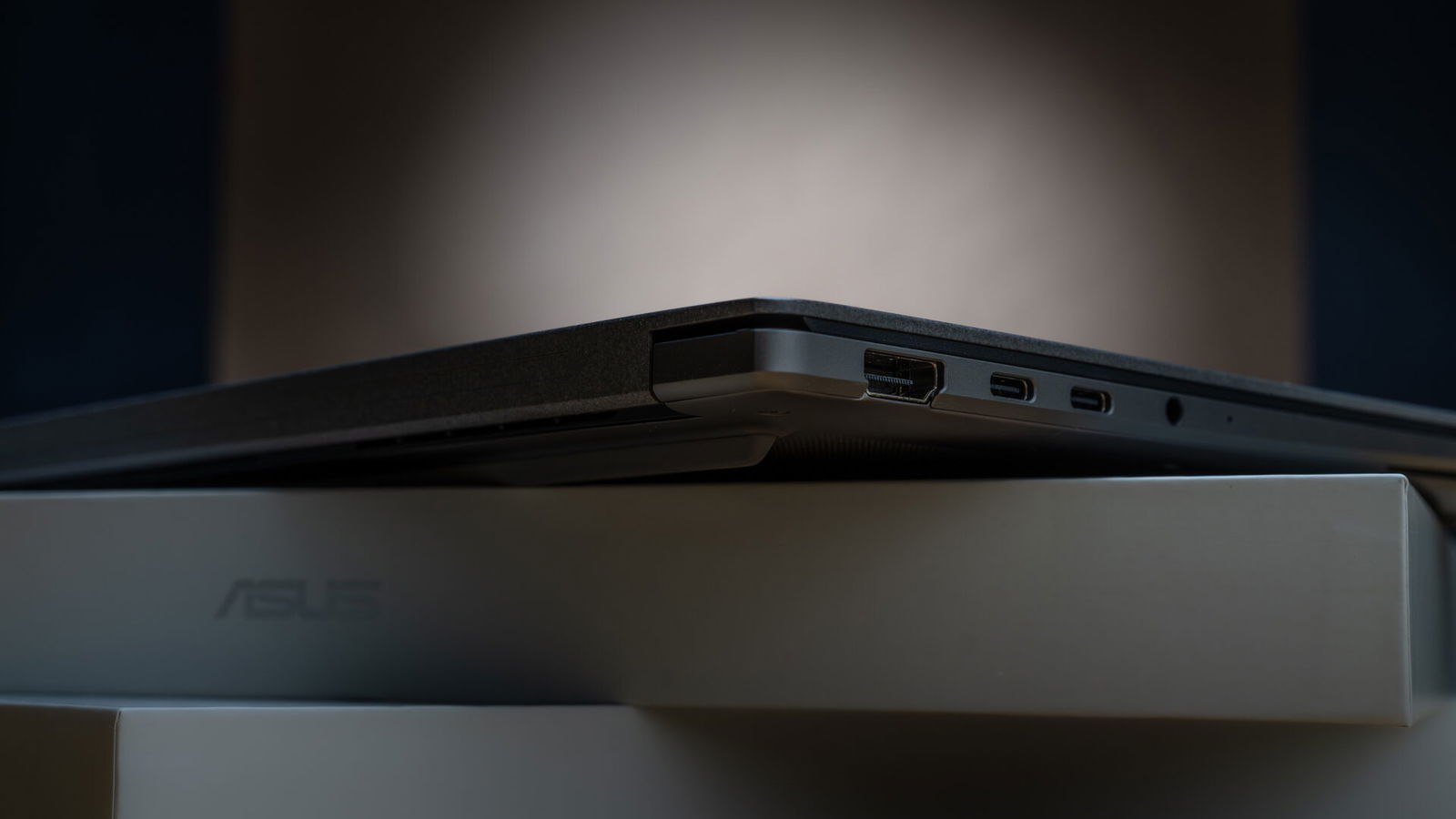
What the two ultra-thin laptops do share, though, is an impressive selection of ports. The Asus Zenbook S14 includes a USB 3.2 Gen 2 Type-A port, HDMI 2.1, a 3.5mm audio jack, and two Thunderbolt 4 USB-C ports, both of which support charging via the included 68W Thunderbolt adapter. For wireless connectivity, all models include Wi-Fi 7 and Bluetooth 6.0.
“All Asus Zenbook S14 models feature a gorgeous 14-inch 3K OLED touchscreen.”
Beyond styling, the display is one of the few areas where a Copilot+ laptop can truly set itself apart, and Asus has done just that. All Asus Zenbook S14 models feature a gorgeous 14-inch 3K OLED touchscreen. A 90% screen-to-body ratio and 120Hz refresh rate make it great for immersing yourself in a game or sinking into a movie.
With 100% DCI-P3 colour coverage, phenomenal contrast with deep true blacks, and peak brightness of 1100 nits, the display is a standout for creative professionals and digital artists. One drawback, however, is its high-gloss finish, which attracts fingerprints and can be tricky when working near a window—less than ideal for a laptop with a touchscreen and brightness capable of overcoming direct sunlight.
That criticism comes after using a very similar display on the Asus ExpertBook Ultra, which featured a hyper-matte finish that was completely fingerprint-proof. So, take it with a grain of salt.

Audio was less impressive. The quad Dolby Atmos speaker setup is serviceable and loud, but lacks the richness of other laptops I’ve used this year. Most notably, the Samsung Galaxy Book4 Edge. Here, the sound quality has very clear highs, slightly muddy mids, and restrained bass. This is definitely a laptop I’d buy alongside a decent pair of Bluetooth earbuds like the Creative Labs Aurvana Ace 3.
Typing on the Asus Zenbook S14 is excellent for a small laptop. The chiclet-style keys are flat-profile, low-travel, and nicely spaced. There’s a slight flex in the CNC-machined chassis that creates a softer typing experience than other all-metal laptops, which often feel overly rigid. As long as you’re comfortable with the tighter layout of a 14-inch laptop, it’s suitable for extended work sessions.
All of the features above are in service of the real highlight: Intel’s new Panther Lake–based Core Ultra processor. At the heart of the machine is the 16-core 2.1 GHz Intel Core Ultra 9 386H. It includes integrated Intel Arc graphics and an NPU capable of up to 50 TOPS. The chip is paired with 32GB of soldered LPDDR5X memory and a 1TB PCIe Gen 4 SSD, with an expansion slot for an additional NVMe drive.

This configuration delivers desktop performance with remarkable efficiency. 32GB of RAM was more than enough for editing short 4K video timelines in Davinci Resolve. Even with effects layers, there was no stuttering or excessive fan spooling. What was most impressive, though, was how cool the frame was after running under heavy load. After a render or extended benchmarking, the Ceraluminum was a little warm but never hot.
For benchmarking, I set the power preferences to performance and ran my tests back-to-back
Blender Benchmarks
Monster 67.99
Junkshop 53.26
Classroom 35.47
Combined score of 156.73, ranking in the top 74%
Geekbench
Single-Core: 2809
The single-core performance isn’t quite on par with Apple silicon, but it’s still more than enough for most users. Even professional photo editors are unlikely to bump up against the limitations of this kind of processing power.
Multi-Core: 14281
As with single-core, multi-core performance is excellent. For 3D rendering, simulation, video exports, or heavy catalog work in Lightroom, you won’t find yourself bottlenecked at the processor.
GPU benchmark: 22746
The GPU score is adequate. It’s not on the level of a dedicated graphics card, but it can handle some light gaming.
Synthetic benchmarking is great for stats, but it’s only impressive when viewed in a spreadsheet. The real question is always: will it Cyberpunk?

The answer for the Asus Zenbook S14 is yes. It’s not always the smoothest, coolest, or quietest experience, but you can technically play Cyberpunk 2077. The caveat is, even at 1080p with ray tracing disabled, you’ll need frame generation to overcome the 25–30 FPS baseline.
“Typing on the Asus Zenbook S14 is excellent for a small laptop.”
Frame generation is effective enough to push the game to 4K, but the system is clearly struggling. The framerate looks smooth, yet everything moves at what feels like 0.8× speed, almost as if V were trying to drive through Jello. Considering it’s Night City, you could blame the smog, but the laptop is the more likely culprit.
Even Arc Raiders, which is notoriously well-optimized, had trouble maintaining a steady 30 FPS at 1080p on the High preset. Dropping to Medium settings stabilized performance at around 45–50 FPS, though it required the fans to put in work.
Animal Well ran without issue.

The laptop has a 77Wh battery, which supposedly lasts 27 hours. I used to dismiss these stats as exaggerations, but after testing enough Snapdragon Elite machines and the ExpertBook Ultra, I’ve had to settle in for long-term tests. With limited screen brightness and ambient workloads like streaming a video, that kind of battery life is indeed possible. Under regular use, those numbers will dip significantly, but you can still expect all-day battery life.
Finally, a note on repairability. There’s only so much you can do to fix a modern laptop. Soldered RAM and limited parts availability have turned many of them into temporary, disposable devices. Even basic maintenance often requires disassembling multiple interconnected layers with specialized tools.
Asus has done a commendable job making this system accessible. Removing the backplate provides immediate access to the components you can actually service. The fans and heatsink can be removed without disturbing anything else. That might not sound remarkable, but it makes a big difference. Being able to perform routine maintenance will help keep these machines out of the e-waste pile for years to come. It’s a small detail, but an important one.

The 2026 Asus Zenbook S14 is a top-of-the-line Copilot+ laptop. It’s elegant, powerful, and thoughtfully designed. The price reflects that ambition, but so does the quality. For users with demanding workloads looking to make a long-term investment, it’s an easy recommendation.