

Listen, I love a good glass-and-metal box as much as the next guy, but sometimes I like to mix up my PC builds, and the Cooler Master MasterFrame 360 Panorama is a perfect case for that. With its striking wraparound tempered-glass design and open-frame philosophy, this mid-tower chassis begs you to build a new rig you want to show off from every angle. After spending time building in it, I walked away impressed, even if it is not really a case that fits everyone’s needs.
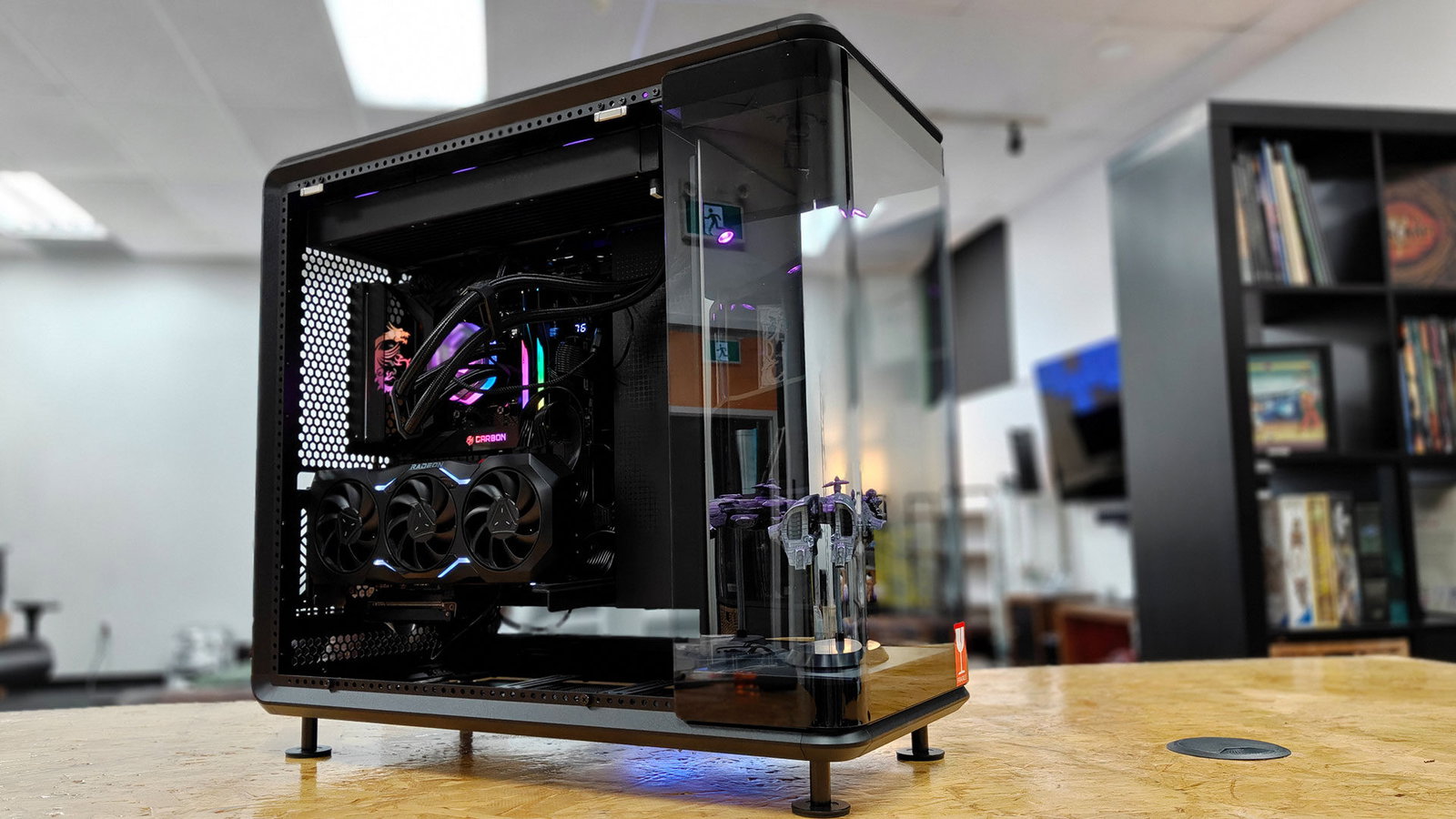
Unboxing the Cooler Master MasterFrame 360 Panorama, you are immediately struck by how much glass this case brings to the PC-building party. Clearly, when every PC case maker at Computex was trying to stuff as much glass as possible into their designs, Cooler Master looked at the trend and said, “Hold my beer,” and I could not be happier about it. Cooler Master has wrapped this case in tempered glass on multiple sides, giving it that fish-tank or display-cabinet look that has become popular among builders who treat their rigs as display pieces.

With so much glass in this case, it is fantastic to see that Cooler Master has made it solid, incredibly clear, and well-fitted to the overall case. The steel frame underneath is solid enough to inspire confidence, and Cooler Master has done a good job of keeping the case’s structural bones from getting in the way of the view. But Cooler Master did not stop there.
On the front of the case, it added display lights and a mirror, for… reasons, and it looks stunning. With the ability to pull the front panel off, the space is designed to showcase a model or other display piece, making it feel like part of your new build. Necessary, lord no, but it is incredibly cool, and something I fully embraced as soon as I saw it while getting everything set up.
As this is a modern mid-tower case, the Cooler Master MasterFrame 360 Panorama supports ATX, Micro-ATX and Mini-ITX motherboards, giving you plenty of flexibility for a new build. There is room for a 360 mm radiator, which is a welcome inclusion for anyone planning a custom loop or a larger AIO cooler, especially for a more powerful system. Fan mounting options are generous, and Cooler Master has clearly thought about how air moves through a case that is more glass than mesh. Airflow will not match a dedicated mesh-front chassis, but for a panoramic design, it holds up well enough that thermal performance does not become a problem under normal use.

Of course, since this is a case meant to show off your components, cable management is where things get a little tricky. Cooler Master has included routing channels and tie-down points behind the motherboard tray, but there is inherently less space to hide the mess of cables. You will need to keep things fairly orderly if you want to get the most out of the design.
If you are the type of builder who takes pride in clean runs and colour-matched extensions, the MasterFrame 360 Panorama will reward that effort. If you are like me and struggle to get everything looking spotless, you may have a harder time. Not a deal breaker, but if you do not take the time, everyone who sees the case will know. There is no hiding it here.
We built an AMD test rig to evaluate this case, including the new AMD Ryzen 7 9850X3D, the ASRock X870E Taichi and the AMD Radeon RX 7900 XTX, and everything went incredibly smoothly. The case had no issues fitting everything we needed to get it up and running, including the 360 mm Cooler Master AIO. Clearly, we also had to drop an EVE Online model in the front area just to make sure we were showing the case off at its fullest. It was also great how the case puts your components front and centre, just the way I like it.

That showcase of components extends all the way to the GPU mounting. While most premium PC cases give the option for vertical mounting, the MasterFrame 360 Panorama only allows it to be mounted this way. With graphics cards getting bigger and more visually elaborate with every generation, being able to display them face-forward through all that glass makes a real difference in how the finished build looks.
“Building in the MasterFrame 360 Panorama is relatively easy, with Cooler Master making it simple to access all areas.”
I love how it all looks when finished, and I enjoy showcasing what is in a build, but it is still strange not to give people the option. It is a minor gripe, mostly because I like to make a choice for each rig about how it looks, but the end result is a showcase for your hardware, so I cannot complain too much.
Building in the MasterFrame 360 Panorama is relatively easy, with Cooler Master making it simple to access all areas. There are enough channels and openings to ensure you are not struggling to get everything in place. The glass panels need to be handled carefully during installation, and you will want to plan your component layout before you start screwing things in. Once everything is in place, though, the result is genuinely striking. RGB lighting, custom coolant loops and clean cable runs all stand out against the open backdrop, and the case does an excellent job of making even modest hardware look like a showpiece.

Cooler Master has outdone itself with this case, and considering it will only set you back $199.99 at the time of writing, it is a fantastic offering for the price. It is well-built, reasonably easy to work in and delivers on its core promise of putting your components on full display. The trade-offs are the ones you would expect from any glass-heavy design: a bit more weight, slightly less airflow headroom and less forgiveness for sloppy cable work (for people like yours truly). None of those are deal breakers, and for builders who want their PC to double as a conversation piece, those compromises are easy to live with.
Needless to say, I am a bit obsessed with the Cooler Master MasterFrame 360. While it is not the perfect case by any means, Cooler Master has delivered an option built for people who like to show off their latest build in style. If you are after a case that turns your build into something worth looking at every time you sit down at your desk, this one delivers. It is a thoughtful, well-executed take on the panoramic case trend, and it has earned a spot on the shortlist for anyone planning a showcase build.

- Front Mirrored Stage for 360° Display Distinctive front-facing mirrored platform reflects your components and collectibles from every angle, creating a unique 360-degree showcase effect.
- Massive Cooling Capability Supports fan sizes from 120mm to 200mm with space for up to twelve 120mm fans—six on the top and six on the bottom—and radiator support up to 360mm.