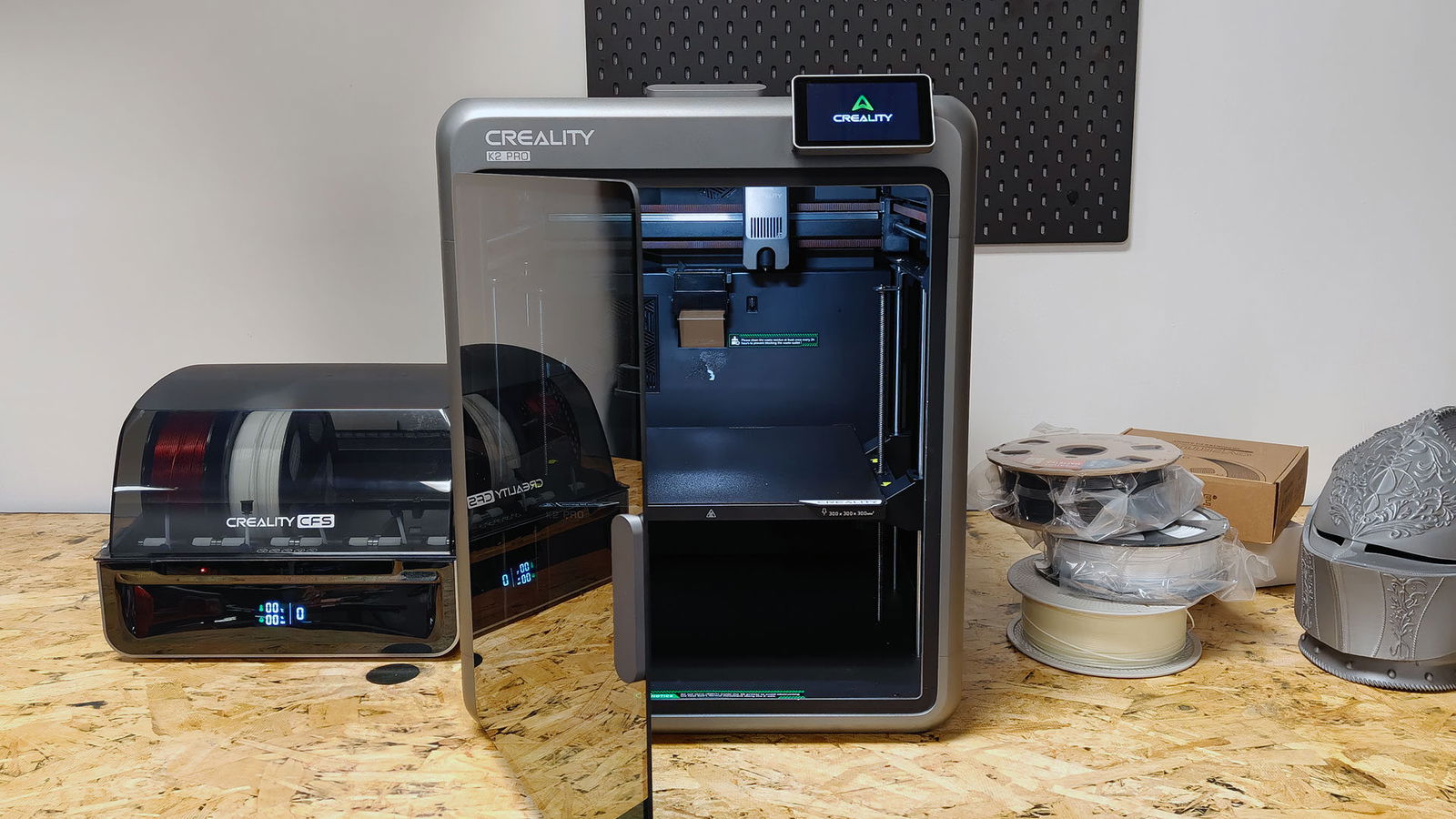


I have had a range of 3D printers on my workbench over the past few months, so when Creality offered the Creality K2 Pro to test, I was eager to see how it compared. For those that don’t know, the Creality K2 Pro is an enclosed, high‑speed 3D printer that aims to be simple to use and easy to trust. It is built for people who want good, repeatable results without spending all their time fixing problems or tweaking settings, and you know something, in spite of some quirks, this is one of my favourite 3D printers of the past year.
Before I go too much into the machine, I want to make it clear that this is not a machine for everyone. It does have a few quirks, and we had to repair something during testing, but when it works, it is easy to use, gets going quickly, and produces high-quality results. It is not as well-built as some of the more expensive machines we have looked at, and it has its limitations, but if you want to dive into high-speed 3D printing, it is a solid machine.

Unboxing the unit, I was surprised by how solid it was, especially for the price. The K2 Pro is a mid‑size machine with a full metal frame and clear panels on the sides and front. The door is designed to help keep heat inside the chamber, which is important when printing tough plastics like ABS or nylon. Unlike some of the past Creality machines, the K2 Pro is not small or light, but it looks clean and well organized, with tidy cable runs and a solid, boxy shape that feels more “finished” than many older Creality printers. It was incredibly easy to get set up and ready for the first 3D printing test.
Inside, the K2 Pro uses a CoreXY motion system, meaning the print head moves along two belts working together. We have seen this sort of setup on a few machines now, including the Bambu Labs H2S, the Prusa Core One, and the Core One L, and have found it to be a solid design in the past. This setup allows for very fast movement, with top speeds around 600 millimetres per second in ideal cases. Most people will print slower than this, but even at more normal speeds, the machine stays quick. The print bed uses a heated, textured PEI plate, so finished parts usually pop off with a gentle flex, while still sticking well during the print.
If you have used previous Creality machines, the company has taken the time to make this one much easier to use. A major focus of the K2 Pro is reducing manual work. The auto‑levelling system no longer takes forever to prepare for a print, and the overall process of getting a model up and running is incredibly quick. This saves a few minutes before each job and still gives a strong first layer.

Two AI‑powered cameras monitor the print: one inside the chamber to detect issues like loose filament or a missing plate, and one on the toolhead to track how well the plastic is flowing. Over long tests, this setup helped the printer earn a reputation for steady, low‑stress printing.
Since this is a combo unit we got in for testing, the K2 Pro uses Creality’s CFS unit, which can feed up to four different filaments into a single high‑flow hotend, giving you the option for multi coloured prints. The printer can switch colours by cutting the old filament and loading the new one. There is a downside to this: that same high‑flow nozzle purges a fair bit of plastic each time it changes colours. On models with many colour swaps, the waste pile can be quite large. This is common on multi‑colour systems, but it is worth knowing if you plan to do lots of detailed, colourful prints.
While it can be wasteful, I have found the quality of the Creality K2 Pro’s multi coloured prints to be solid overall. I tried a range of models with the printer, and they all looked good and managed the colour changes well. I will note that if you want a multicoloured print, the print time will increase significantly. A small, hour-long model could double in time when you add colour changes, and this is even more true if you want complex changes that constantly swap out colours, making what could have been a quick print into an afternoon-long endeavour.

The enclosed, heated chamber is a key feature that sets the K2 Pro apart. It can reach around 60 degrees Celsius inside, which helps stop parts from warping or cracking. Materials that are hard to print on open‑frame machines, like ABS or some nylons, come out much better in this controlled space.
For softer plastics such as PLA, I have seen users on 3D printing forums talk about leaving the door slightly open to prevent the inside from getting too warm, but that is a simple trick rather than a serious flaw, and honestly, I never found this necessary. I printed PLA flawlessly, both with the door open and closed, and the machine did a good job of dissipating heat when needed.
“While it can be wasteful, I have found the quality of the Creality K2 Pro’s multi coloured prints to be solid overall.”
Moving to the software side, the K2 Pro is designed to use Creality’s slicer, based on OrcaSlicer and tuned for the K2 line. While it feels annoying to have multiple slicers all based on the same core code, it works well. It includes built‑in profiles, remote control and job monitoring through Creality’s cloud system.
The 4‑inch touchscreen on the front of the printer is clear and simple, with previews of parts, easy access to calibration tools and quick controls for chamber temperature and lights. Some users may find the slicer a bit busy at first, and very complex projects can cause short pauses, but most people adjust after a little time with it, and for the most part, it does what it needs to do and does it well.

You also have the option of using Creality’s mobile app, which makes printing and monitoring your machine from a phone straightforward. I initially dismissed it as a gimmick, but it works surprisingly well. The app sends alerts if something goes wrong and allows users to download and print models directly from the Creality Cloud library.
That said, the app does include upsells. Not all models on Creality Cloud are free, and users may be prompted to purchase designs they like. Fortunately, filters allow you to display only free models if preferred. Many of the paid designs are well-crafted, and supporting creators is not a bad thing.
Print quality is one of the Creality K2 Pro’s strongest features. In testing across a range of models, including small characters, figurines, brackets and larger display pieces, the printer produced sharp corners, smooth surfaces and strong detail. Even at high speeds, results remained respectable, and prints finished quickly.

When speeds were reduced to more standard levels, overall quality approached what you would expect from more expensive prosumer-grade machines. Flexible TPU filament is the one area where the K2 Pro can present challenges. It is usable, but may require additional tuning of speed and tension settings to prevent clogs and uneven extrusion. If TPU is your primary material, be aware that dialling in the correct settings can take time. It is also recommended not to use the CFS system when printing TPU, which is consistent with most multi-material 3D printers currently on the market.
“Print quality is one of the Creality K2 Pro’s strongest features.”
Walking into this review, I read over some of the 3D printer forums to get a feel for the setup and scenarios I could test. The online discussion was very mixed with the Creality K2 Pro, so I went in unsure of what to expect. But honestly, while not quite as consistent as some of the more expensive machines in the field, it is significantly cheaper, so that is expected. Even with this in mind, the models looked good and were consistent, which is important when you don’t want to waste filament or your time. Once you have everything dialled, even more complex models can turn out incredibly well.
But what I think is most important for new users is how easy the operation is when you just want things to work. The printer handles levelling, flow calibration, and other setup tasks with minimal user input, making it accessible to frequent printers who prefer to avoid extensive manual tuning.

For long prints that run for many hours or even days, AI cameras and flow-monitoring systems help identify issues before they compromise an entire job. At top speeds, the printer can be loud, as is common with fast CoreXY machines, but quieter profiles are available and work well for overnight printing. It just works when you need it to, and that is a good thing, especially when you love the concept of 3D printing but do not have the mental bandwidth to worry about potential points of failure. Not everyone wants to tinker with their machine, and thatis okay!
But with anything mechanical, things do break from time to time, and I am happy to report that the K2 Pro is incredibly easy to fix for most things. One of the motors in the extruder went out while I was testing the machine. It did make the machine inoperable while I waited for a part, but installing the part once it arrived was incredibly simple.
It took me maybe 20 minutes to take it all apart and reinstall it, and once it was all in place, it worked as good as new. The documentation on the Creality site is relatively easy to follow, and unless it is something really complex, as long as you are not afraid to get your hands dirty, you should have no issues repairing most basic things.

I mentioned earlier that this machine is less expensive than some of the models we have reviewed recently, but that does not make it inexpensive. The K2 Pro Combo, which includes the four-colour CFS unit, sells for about $999 USD. That price places it above entry-level bedslinger printers and below many high-end multi-material systems.
The cost reflects both the hardware and Creality’s effort to incorporate years of community feedback into a single, ready-to-use package. It represents a fair entry point for users seeking a more advanced machine. Comparable offerings from Prusa and Bambu Lab cost significantly more and tend to feature more robust construction. Creality appears to have found a middle ground. The K2 Pro is easy to use, similar to Bambu Lab machines, but not as open to tinkering as a Prusa. For many users, that balance makes it a practical starting point, provided they are willing to experiment and explore the machine’s capabilities.
The K2 Pro also demonstrates how far Creality has evolved since the early Ender models. Out of the box, it delivers a heated chamber, fast CoreXY motion, built-in AI monitoring, and support for up to four colours, all without requiring constant supervision. There are trade-offs, including additional purge waste, finicky TPU performance and software that still needs refinement, but these are offset by many strengths. For students, hobbyists and small shops looking for a capable and dependable 3D printer, the Creality K2 Pro is a strong option, particularly for those planning multi-colour projects or working with tougher materials.