
I am always on the hunt for compact content creator tools that are, first and foremost, easy to use. The Insta360 Flow 2 Pro Gimbal instantly stood out to me because of its style. It folds up small enough to slide into a soft carrying bag, can sit flat at the bottom of my backpack and doesn’t add a lot of bulk overall, but could it also meet the “easy-to-use” criteria?
First, I want to preface that I tested the Insta360 Flow 2 Pro Gimbal with the Xiaomi 17 and the realme GT 8 Pro smartphones. The device does have capabilities for Apple devices, like control via an Apple Watch, Apple ProRes compatibility and more; however, as an Android user, these were not tested. I can say with certainty that Android users are not lacking in features with the Insta360 Flow 2 Pro, as it is still packed with things you can do, even if you’re not with Apple.

The device itself will work with any smartphone that meets the following criteria:
- Phone thickness: 6.9–10 mm
- Phone width: 64–84 mm
- Phone weight: 130–300 g
- Wireless: Bluetooth 5.0
- NFC: ISO/IEC 14443A
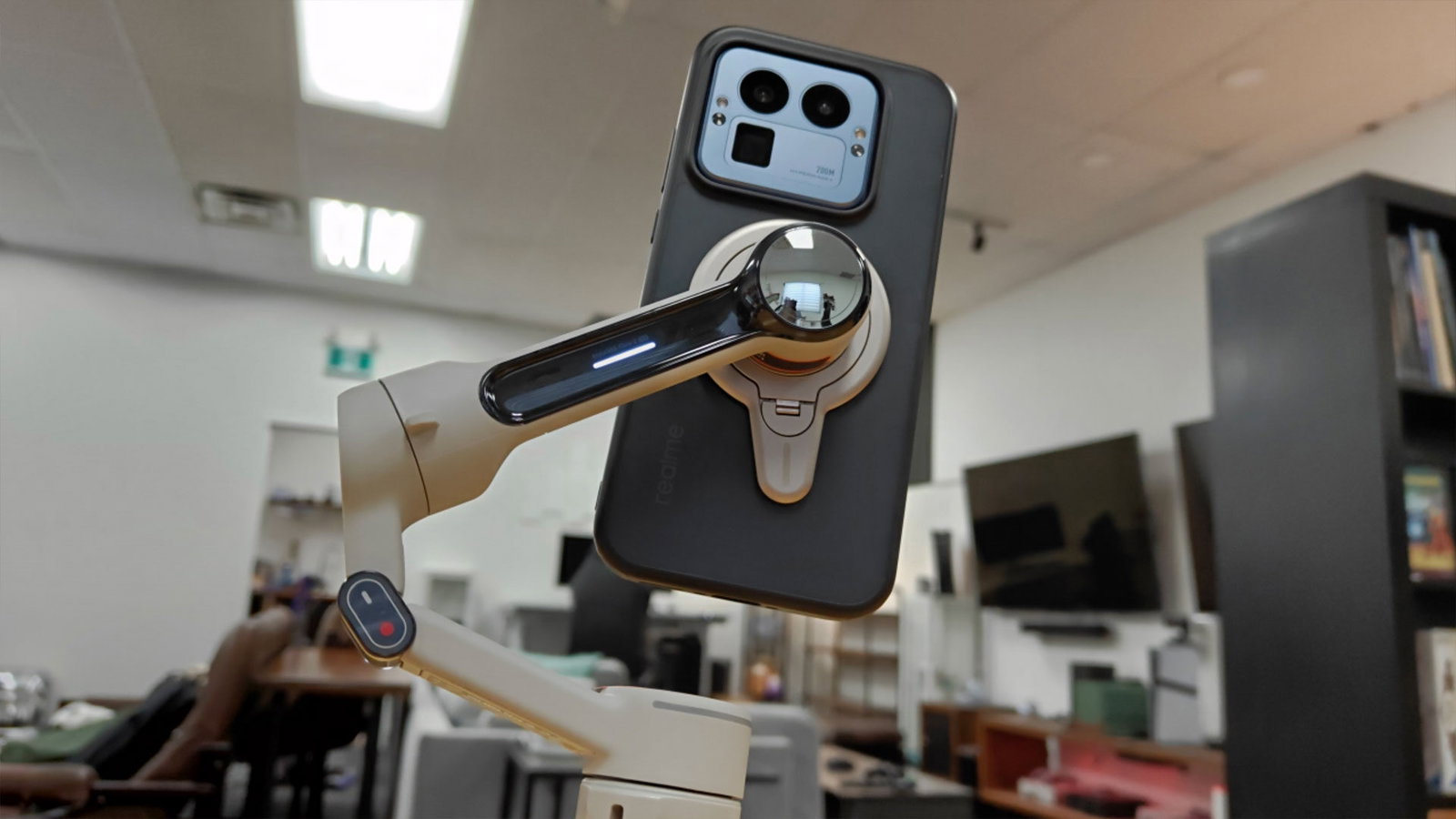
Insta360 has also included a few options allowing for even more accessibility. The Flow 2 Pro can either attach to your device via an included metal clamp that connects to the gimbal magnetically, or if you have a magnetized case, you can attach your phone clamp-free. You can also connect to the gimbal via Bluetooth and the Insta360 app manually, or you can use the handy-dandy NFC tap, which connects your phone almost instantly. It was seriously the easiest thing I have ever paired.
What was really important to me with this gimbal was how easy it was to get up and running. Once paired, which again was a breeze, basic functions were almost second nature. There is a built-in Auto Mode for beginners, which reduces shakes and automatically adjusts sensitivity. For more seasoned creators, there are even more modes:
- Follow mode: More sensitive, but will follow the subject faster.
- Pan Follow Mode: Will only follow left to right, not any other direction.
- FPV mode: Unlocks all axes, allowing the gimbal to move in all directions.
- Lock Mode: The smartphone won’t move when you do; it stays locked on target.
- Active Plus: Can be used with any mode except lock mode, applies faster follow speed. Good for sports or other quicker-moving subjects.

Regarding ease-of-use, the Insta360 Flow 2 Pro gimbal is, on the surface, really simple to get started. The biggest hurdle if you are looking for basic functions is learning the button-press combinations. This gimbal can do a lot, but unfortunately, to make it do those things, and not have a massive interface, there are many things to remember, like whether or not to press once, twice or three times, or to press once and hold, or press once and then again and hold…you get the picture. It can be overwhelming.
The Insta360 Flow 2 Pro is a 3-axis gimbal with an impressive range of motion: a 360° continuous pan, a –390° to 135° roll, and –99° to 231° tilt. The max control speed is 120° per second, allowing for a smooth, steady shot. The device can also be used in a variety of ways, with a built-in tripod and selfie stick. You can easily switch from on-the-move shooting to stationary to at a distance, and all these features don’t add any noticeable bulk to the overall device.
The tripod is especially helpful for creators who may be working on their own. One of the Flow 2 Pro’s main features is its tracking ability, featuring Deep Track 4.0. In testing, this was incredibly easy to set up and was overall successful. I did notice that if the subject was moving too fast or out of frame, it would take time to catch up, but that is to be expected, as you don’t want a shaky or blurred pan.


The Flow 2 Pro can track multiple subjects at once, adjusting framing to keep the group in frame and centered and it can also successfully track subjects even at extreme zooms. However, this is a feature for iPhone 12 and later models, and select Android devices, including the Samsung Galaxy S25 and S24 series.
“The Insta360 Flow 2 Pro Gimbal is compact, light and folds up for travel.”
The Insta360 Flow 2 Pro Gimbal is compact, light and folds up for travel. The Gimbal itself is only 357g, with the AI Tracker adding 14g and the clamp adding 25g. It is 97.9 x 178.4 x 36.7 mm folded and 121.1 × 282.1 × 54 mm unfolded. Though it doesn’t fold down into a perfect shape, it does fold flat enough to sit at the bottom of my bag neatly, making it great for travel.
In terms of battery, the Insta360 Flow 2 Pro features 1100mAh of power. Insta360 boasts 10 hours of runtime, but in testing, I was noticing around a 15% drop per hour, though that heavily depends on what you’re doing with the device. It takes about 90 minutes to two hours to charge to full, but it is still impressive when you think of how much use you get from that one charge. It should last a full workday of shooting on and off.
For a gimbal with this many features, the Insta360 Flow 2 Pro comes in at a competitive price, $159.99 USD, with a creator bundle coming in at $189.99USD. For a creator starting their journey, this is a big chunk of change, but I firmly believe that the Flow 2 Pro is a gimbal that will grow with you. Not only is it easy enough to use for beginners, but there is a great balance where you can choose to use it as a simple tripod or stabilizer, or swap over to more pro-level features like AI-tracking when you are ready.
The Insta360 Flow 2 Pro Gimbal would be a great investment for any creator at any level.

- Versatile Tracking in 200+ iOS Apps: The first and only gimbal series with Apple DockKit*. An advanced gimbal stabilizer for iPhone and the ultimate tool for content creation, video calls, online meetings, live streams, and more with 200+ compatible iOS apps.
- Active Zoom Tracking: A first* for gimbals, Flow 2 Pro can track fast movement precisely, even at up to 15x zoom! Perfect for sports games, on-stage performances, and more (available for Pro & Pro Max models of iPhone 12-16.)