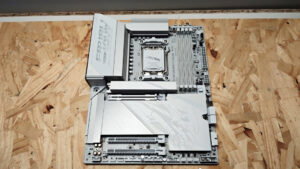

When reviewing the new Intel Core 200S Plus refresh of Arrow Lake, I was sent the Z890 GAMING PLUS WIFI6E to use in our test build, MSI’s latest entry in the LGA 1851 motherboard range. It is built to be a mid- to enthusiast-tier option that delivers the latest features without the price to match. This includes support for Wi-Fi 6E and 5G LAN connectivity, along with ample ports to ensure your new rig is ready for a range of uses. While it is not quite as sleek as some of the more expensive LGA 1851 boards on the market, MSI has found the sweet spot between value and features, and it has led to a pretty solid motherboard.
For those who are not following the latest trends in PC hardware, the LGA 1851 socket is the board used by the new Intel Core Ultra series, including the 200S and 200S Plus chips, the latter of which just launched recently. The MSI Z890 GAMING PLUS WIFI6E is built to take advantage of all the new features on offer in this range, while also being compatible with the latest lineup and delivering the performance that gamers, creators and the average person building a PC may need.

On the surface, the Z890 GAMING PLUS WIFI6E is a pretty standard MSI design, and for the most part, that is true. The black PCB with subtle design elements is a sharp-looking board, but it does not stand out compared with the LCD screens and extensive RGB lighting found on higher-end boards. Still, what matters to someone who wants a motherboard that delivers performance and connectivity is that MSI has made some solid efforts here to make it worth considering for your next build.
While it may seem minor, the EZ M.2 Shield Frozr II is a great addition that makes dropping an M.2 SSD into your PC easy, especially when you do not want to break out the screwdriver. More board makers are including something like this, and when you build as many PCs as I do, it is a godsend. The same is true for the EZ PCIe Clip II design, which makes removing a GPU easier.
Again, this is less important for people who build a PC and leave it for years, but for anyone who has struggled to release a GPU for testing, or just to swap it out, not having an easy way to reach the clip is tedious and frustrating. It is something many top-end boards include by default, but it is great to see more entry-level to mid-tier offerings include it.

Now, looking at the I/O on the board, the Z890 GAMING PLUS WIFI6E includes a good, but not amazing, selection of ports ready for you to start plugging things into your new PC. It features one HDMI 2.1 port and one DisplayPort 1.4 connection, which is great for those looking to start or use a system without relying on a discrete GPU, opting instead for Intel’s iGPU solution. It also features one USB 20 Gbps Type-C port, two USB 10 Gbps ports, six USB 5 Gbps Type-A ports and eight USB 2.0 ports, giving you a solid selection right out of the box.
“MSI has made some good choices with the Z890 GAMING PLUS WIFI6E and found smart ways to make it feel accessible without feeling cut down…”
On the networking side, the Z890 GAMING PLUS WIFI6E includes Intel Killer E5000B 5G LAN, a step up from the now-standard 2.5G speeds found on many entry boards, along with support for Wi-Fi 6E. That means the board supports the 6 GHz spectrum, MU-MIMO, BSS colour technology, up to 2,400 Mbps theoretical throughput and Bluetooth 5.3 on board.
It even features a button on the back to flash the BIOS, a feature that has come in handy in many board reviews because of the need for a new BIOS to work with a particular CPU. Oh, and let’s not forget it features 8-Channel HD audio, which is great for gaming, content creation, or just knowing you have it if ever needed.

Looking at the main part of the board, the MSI Z890 GAMING PLUS WIFI6E features one PCIe 5.0 x16 slot, two PCIe 4.0 x4 slots and one PCIe 3.0 x1 slot, giving you a range of build-out options if you want to deck your system out with a modern GPU, a capture device and even a range of expansion cards like 10G networking, if you are so inclined.
It also boasts the possibility of a quadruple M.2 setup, with one Gen5 x4 slot at 128 Gbps, under the Lightning Gen 5 branding, three Gen4 x4 slots at 64 Gbps each, and four SATA 6 Gbps connections for legacy devices like hard drives and SSDs, giving you a bit of flexibility to set your system up the way you need.
The board features the latest memory support and offers four DIMM slots supporting dual-channel DDR5, with overclocking headroom reaching DDR5-9200+ MT/s. It uses MSI Memory Boost technology to help push your DDR5 as far as it can go, and it works surprisingly well. MSI has built a BIOS that makes most of the tweaking incredibly easy, and while testing, it was trivial to jump in and try different configurations to make sure I got the most out of the system. It also features a 14+1+1+1 Duet Rail Power System with 55A DrMOS, which should give more than enough power for even the more extensive gaming or content-based builds.

On the build-quality side, MSI has made some good choices with the Z890 GAMING PLUS WIFI6E and found smart ways to make it feel accessible without feeling cut down. It still features the EZ connections for the SSD and PCIe ports, offers a solidly made board with extended heatsinks to keep vital components cool, and delivers a fantastic BIOS experience that is easy to navigate while still offering more advanced features if you decide you need them.
At the same time, it does not try to tackle the same market as the MSI GODLIKE or MEG tiers of boards, so it lacks the heatsinks spread across the board and some of the metal plating that gives those motherboards weight, and it may feature a few fewer ports. But honestly, for the average person, that is okay. This board delivers 80 percent of what those pricier motherboards offer, and for most people, that is the perfect level, especially when you do not need to spend hundreds more just to get those extra features.
MSI has found a great middle ground with the Z890 GAMING PLUS WIFI6E, delivering a solid board that features most of what a new LGA 1851 build can need, even if it does not deliver every feature found on the more expensive boards in the range. It is efficient in its performance and features, and feels tailor-made for gamers and creators who want the latest without the nonsense getting in the way of a new PC. It may not be flashy, but the MSI Z890 GAMING PLUS WIFI6E delivers where it matters most.