Audio interfaces make streaming so much easier, mixing multiple sources and, at times, offering a nice combination of useful tools and fun toys to help you connect with your audience. The OneOdio Solocaster is a simple mixer built for someone who does not want to be overwhelmed by an overcomplicated setup, but also does not want to lose too much functionality.
In the box, you get the OneOdio Solocaster, a USB-C cable with an attached USB-C to USB-A adapter, a TRS cable and the instructions, which really are not helpful, especially for a newcomer, as they explain what the buttons are but not how to use them. Someone new to streaming and audio probably won’t know what loopback or sidechain means, and a little more instruction would probably be appreciated.
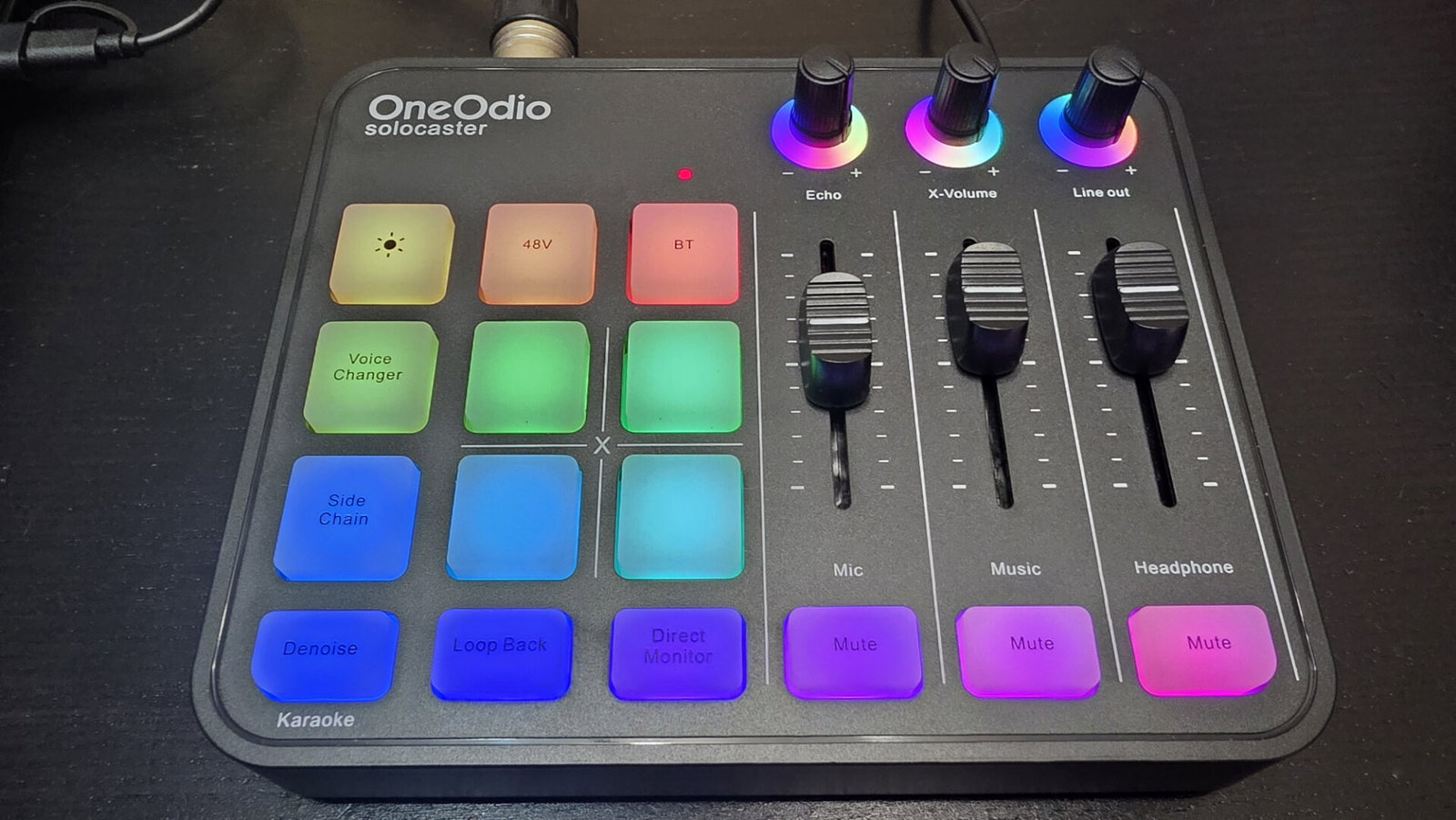
The OneOdio Solocaster has an all-plastic body, but it does not feel cheap. The rubber footing along the bottom keeps the mixer firmly in place. On the back, you have a lot of I/O, starting with the combo jack, which allows you to plug in an XLR mic or a 1/4-inch TRS or TS cable for instruments. You also have a switch to toggle between instrument and microphone, so make sure you are on the right setting if something is not working.
“The OneOdio Solocaster is a simple mixer built for someone who does not want to be overwhelmed by an overcomplicated setup, but also does not want to lose too much functionality.”
You also have separate 3.5-mm headphone and headset jacks, as well as a 3.5-mm line-out jack, a line-in jack and a USB-C port to connect to your PC, console or phone. The controls on the surface include an RGB control, allowing you to switch between 11 different modes. The lighting is vibrant and makes for a nice addition to any desk. The OneOdio Solocaster also provides 48-volt phantom power for condenser mics that need it, and a Bluetooth connection button to wirelessly play audio through the mixer with the music fader.
There are four programmable sound-effect buttons on the OneOdio Solocaster. You can hold down a button to record a vocal sample or other audio from your computer to play back later. It is not the best way to go about storing sound effects on the device. I would rather have seen a software solution or something like that, but at least it is something. It also gives you a voice changer with a number of preset voices that pass through the mixer automatically. The mode you are in is indicated by the change in RGB colour on the button.

The OneOdio Solocaster’s side chain is a ducker for your music, so when the mixer determines you are speaking, the music drops down to make sure your voice is the most prominent audio source. There is also a loopback feature that lets you pass audio being sent to the mixer back to the output so it can be part of your stream. Denoise does a decent job of removing ambient audio from the mix. It is not perfect, but for the price, it does fine.
“The biggest issue with the OneOdio Solocaster is the levels going into a DAW, OBS or wherever you are sending it.”
You can control reverb with the echo dial, with a more intense echo as you turn the dial up. X-Volume controls the volume for your programmable SFX pads, and line out controls the volume for your line out. The faders for your mic, music and headphones, as well as the dials, are a little stiffer than I would like, and frankly, I feel like X-Volume should be on the faders and headphones should be on the dial, as the SFX is part of your mix, not your headphones.
The biggest issue with the OneOdio Solocaster is the levels going into a DAW, OBS or wherever you are sending it. I found that, even with everything turned all the way up, the levels were lower than desired and needed to be boosted further to reach acceptable levels. Listening to the mic through your headphones is also pretty quiet, which makes it harder to tell which voice changer you are using. There are multiple low-pitch and high-pitch modulations that are slightly different, but tougher to pick apart at low volumes.

The overall quality of the OneOdio Solocaster’s audio is OK at best. It is clear and has minimal noise, but lacks the vocal presence of some of the more well-known audio interfaces on the market. With no EQ or other processing, I am not getting the most out of my voice in a broadcast, and that is a whole lot more important to me than a denoiser in a world of AI noise reduction in post or voice modulation.
The $49.99 US price tag definitely lowers the bar in terms of expectations one might have about an audio interface, though. It makes it a good starter device for someone who is just dipping a toe in the content-creation waters without a larger investment. It can give a beginner some of the fundamentals they need as they become more serious broadcasters, but for those of us who are already there, you know you are getting what you pay for.