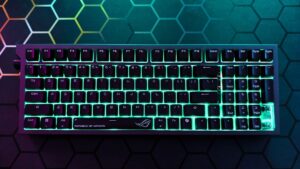
One of the recent buzzwords in tech has been TMR switches, or TMR actuation, and it is the technology that the Womier SK75 TMR brings to the table. The result is one of the most solid and heavy-duty keyboards I have used in recent memory.
The Womier SK75 TMR, which stands for Tunnelling Magnetoresistance, represents a step forward from traditional Hall-effect switches and is among the first keyboards to feature the technology. When paired with its premium build quality and a massive 8,000 mAh battery, it offers gamers and keyboard enthusiasts a compelling option to consider.
The Womier SK75 TMR is a 75 percent keyboard, but its compact layout is misleading. Weighing in at about two kilograms, or 4.4 pounds, it feels exceptionally stable on a desk, even without relying heavily on its rubberized feet. Put simply, this is not a keyboard designed with portability in mind.

Included in the box are the Womier SK75 TMR itself, its dedicated USB receiver, a fairly standard, unbraided USB-C cable, a dedicated USB 2.5Ghz wireless receiver, and a handful of additional keycaps, including some coloured caps for the WASD switches on the board.
“Once you get past that learning curve, typing on the Womier SK75 TMR is satisfying.”
Taking a peek under the keycaps reveals that the Womier SK75 TMR features custom Outemu magnetic switches with a 0.1mm latency and 0 mm deadzone, coupled with a polling rate of 8000 Hz in both wired and wireless modes via the included 2.5 GHz dongle. And if you’re less fussed about response times, or are more of a casual user, the Womier SK75 TMR also offers Bluetooth connectivity, making it a versatile keyboard to use for users with multiple computers and other devices that can benefit from a premium-feeling typing experience.
In terms of the typing experience itself on the Womier SK75 TMR, users used to a larger-format keyboard will take some time to adjust to the smaller form factor afforded by the 75% chassis, but once you get past that learning curve, typing on the Womier SK75 TMR is satisfying. My only real issue is that, compared to other premium boards I’ve used in the past, I found the actuation sound or the “thunk” of pressing the keys a little louder and hollower than usual, where I prefer a “creamier” actuation versus the louder feel of the SK75 TMR.

The kepcaps themselves on the SK75 TMR feature a textured matte finish that grips your fingertips nicely and feels like it can withstand the natural oils in your hands after prolonged use. Of course, it’s hard to say without months of use, but from a practical point of view, the keycaps on the SK75 feel solid. If they do become worn down, the included keycap remover makes it easy to pry them up for cleaning or replacement.
On that note, easily my biggest gripe with the SK75 TMR keyboard is the placement of the power switch, that Womier decided to put recessed under the Caps lock key, which, from an aesthetics POV, does look clean, but as someone who turns their devices off when not in use, the idea of an idling keyboard, even with its large capacity battery, is disappointing.
“I found the Womier SK75 TMR to be excellent and ultra-responsive in all the games I tested it with.”
Pairing the SK75 TMR is straightforward: hold the FN (function) key and the Q, W, or E key for Bluetooth, or the R key for dongle use. For those paranoid about latency, you can use a wired connection via USB, but I found myself sticking with the 2.4 GHz mode for most of my testing.

When it comes to real-world testing with games, I found the Womier SK75 TMR to be excellent and ultra-responsive in all the games I tested it with, including titles like Marvel Rivals, Borderlands 4, and my go-to game for when testing keyboards, The Typing of the Dead: Overkill. Finally, on the software side, Womier offers a no-frills, highly functional Windows app that makes it easy to quickly set RGB profiles, macros, and shortcuts using the free software, which readers can download from the Womier website.
Outside of it being perhaps a pound or two, on the heftier size, relegating the Womier SK75 as a stationary keyboard, some slightly too loud keys, and the lack of an easier-to-access power toggle, Womier’s latest efforts give next-gen enthusiast-level performance for a reasonable price, making it the perfect solution for serious gamers and esports players.
When it comes down to it, the Womier SK75 TMR keyboard is a standout board with a small form factor that feels great to type on, made better by a staggering high polling rate and quality parts that should hold up to the test of time. Users looking for a keyboard for a more permanent spot in their setup, one that offers the latest greatest in acuation, the Womier SK75 TMR is an easy recommendation.