


With more laptops moving towards having solely USB-C ports and removing other traditional ports, the need for dongles or docks is becoming greater, especially for those in the business sector who use their laptop paired with multiple monitors. However, not all docks and dongles are made the same.
The Kensington SD7100T5 EQ Pro Thunderbolt 5 19-in-1 dock looks to cater to power users who need all available ports, while hiding a couple of interesting party tricks up its sleeves. Coming in at a hefty price tag of $449.99, this will certainly be one of the more expensive options on the market, although businesses will likely be the ones providing them for their workers.
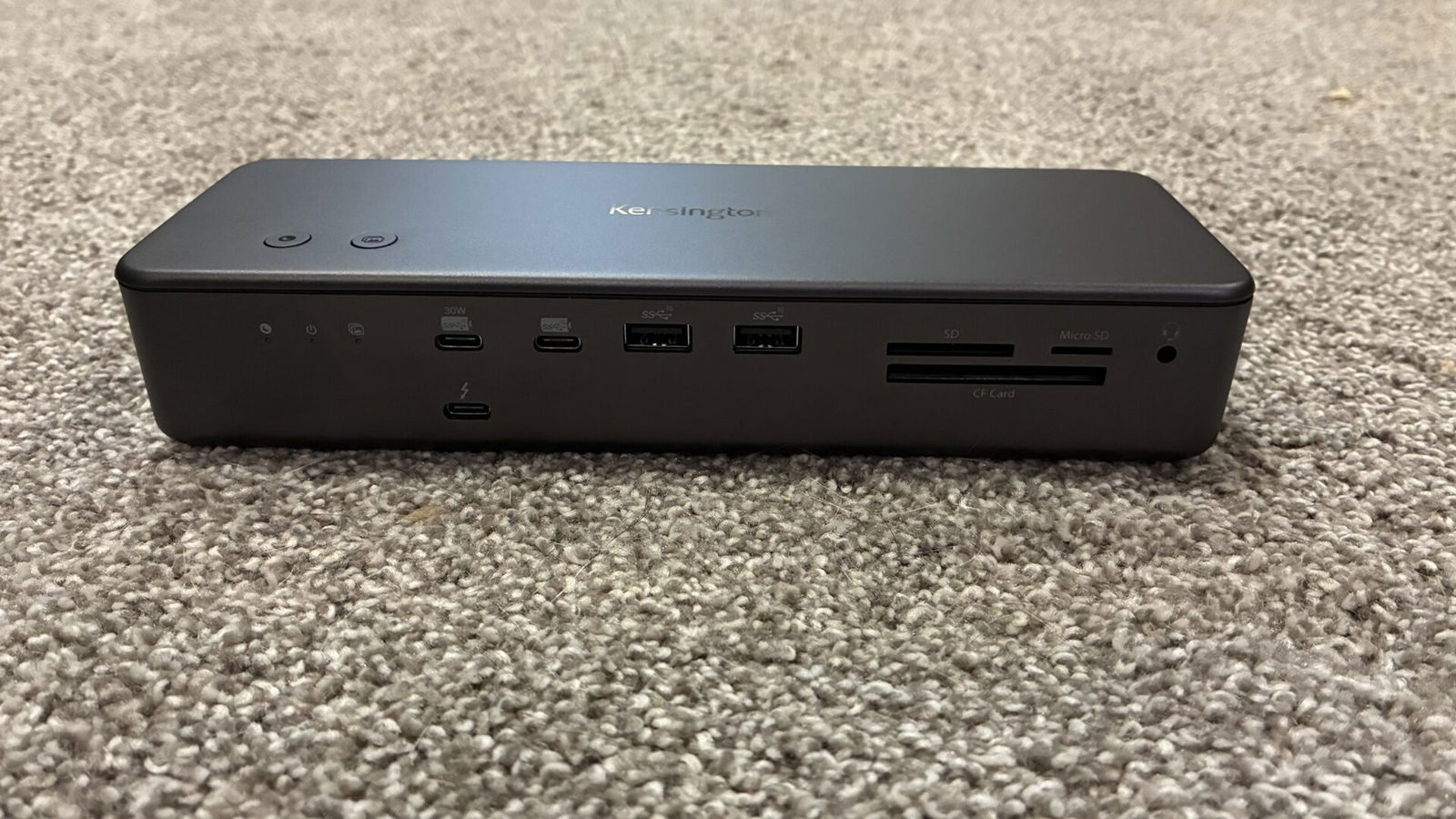
Taking a look at the many available ports on the Kensington SD7100T5 EQ Pro, you will find a total of 17 ports between the front and back of the dock. Starting off by taking a look at the front of the dock, you are greeted by dual USB-C 3.2 Gen2 ports, the first capable of outputting 30W of power. Just to the right of them, you find dual USB-A 3.2 Gen2 ports for use with devices such as keyboards, mice, flash drives, etc.
Moving along, you find not only a full-size SD card slot, but also a MicroSD and Compact Flash card slot. Additionally, you will find a combo microphone/headphone jack to the right of the card slots, and finally, one of the Thunderbolt 5 ports located just below the other 2 USB-C ports, capable of powering an 8k display at up to 60Hz.
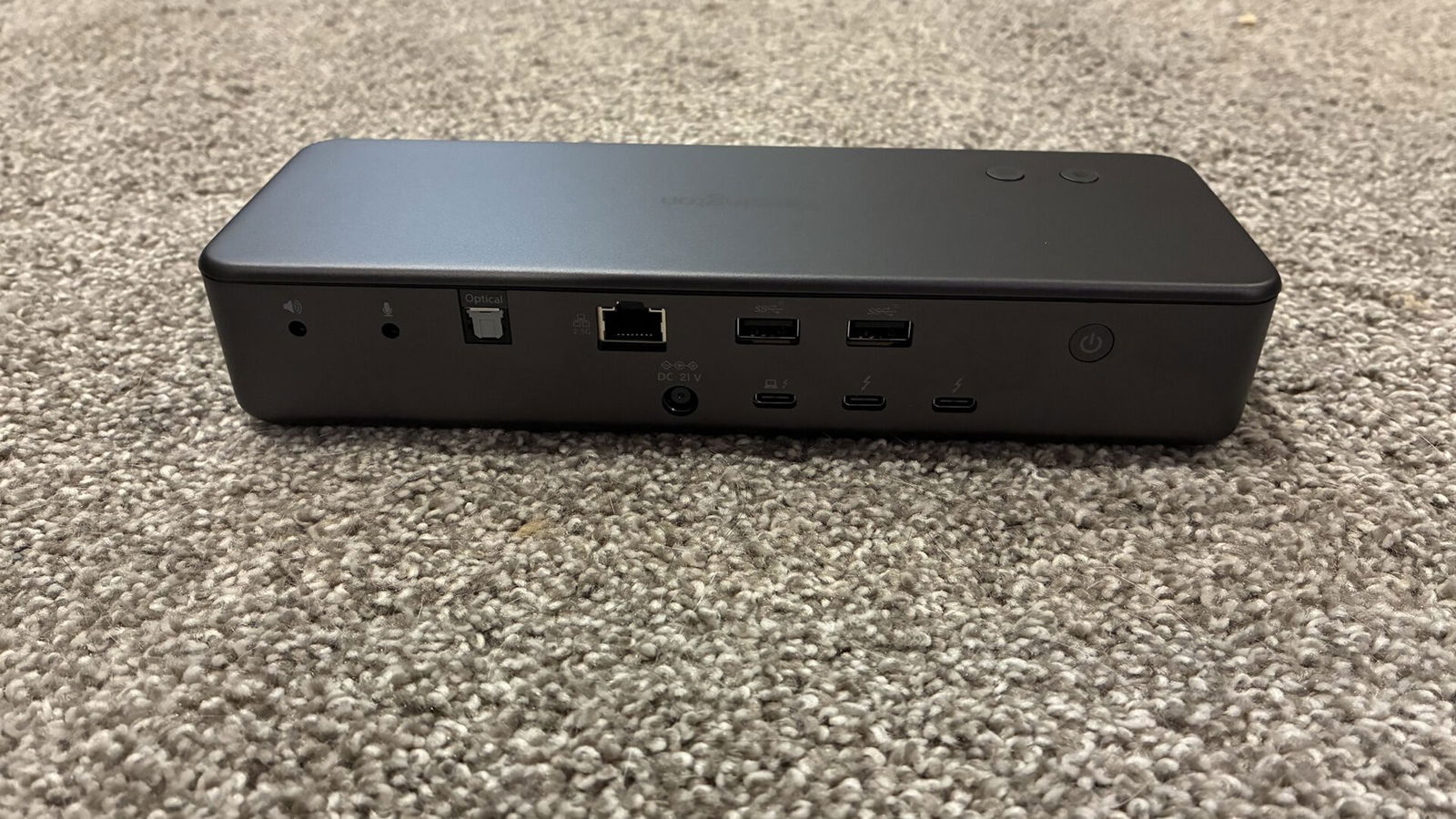
Flipping the device around and looking at the back, you will find another plethora of ports for further flexibility. Moving from left to right, you find an additional headphone port, a dedicated microphone port, a Toslink Optical Audio port, a 2.5 Gigabit Ethernet port, two more USB-A 3.2 Gen2 ports for additional peripherals, and a power button. Just below the Ethernet port and USB-A ports, you find the power adapter plug, the Thunderbolt 5 port used to connect the dock to your laptop or computer and two additional Thunderbolt 5 ports that can also power 8K displays, giving you the ability to run up to three monitors.
Where things get interesting is when you look at the top of the dock, you find the first of the Kensington SD7100T5 EQ Pro’s special features. There are two buttons that can be mapped to perform a wide range of tasks or operations through Kensington’s Konnect software. One task I found particularly useful was the ability to back up photos from my iPhone to my SSD with just the press of a button. This is something I could see being especially helpful to users and businesses who take several photos on their phone regularly, such as construction/landscapers, and need a quick way to offload them to their computer. The second button I have set to quickly lock my laptop when I am walking away from my computer or desk, so no one can access my computer.
“To say the Kensington SD7100T5 EQ Pro dock has improved my overall productivity would be an understatement.”
The feature I found most interesting on the Kensington SD7100T5 EQ Pro is one you don’t see, as it is hidden internally. For additional flexibility, there is a hidden M.2 SSD slot that you can use for additional storage on your computer, something I can see being extremely useful for Mac users, as Apple tends to only offer minimal storage on their portable devices. While I tend to typically carry a portable SSD in my tech bag, knowing I can save having to carry one more thing eases my mind more.
All these features together make a combination that has not only made life easier for me when in use, but also enhances my experience and ensures I can get my work done much more efficiently. I regularly found myself using several USB ports at a time, combined with the MicroSD slot, to load and offload different files on my various emulator handhelds. Having enough ports to connect all my devices at once while still having the ability to hook up additional hardware, all while not using any more than a single port on my laptop, was beyond convenient and helpful.

Hooking up multiple monitors, I generally only ran dual 1080p monitors at 60Hz, although having not only the ability but the power to run up to triple monitors on top of being able to run all my devices at a single time almost felt a little magical and was truly impressive to see.
With all the power the Kensington SD7100T5 EQ Pro has to offer, it is important to remember to keep it somewhere where it will not have a problem dissipating heat. While I never had it reach a temperature that felt alarming, at least a handful of times, I did feel it getting noticeably warm to the touch. Keeping it on your desk with easy access is what I would recommend, as it keeps all ports within reach, which should ensure it receives more than enough airflow to keep the dock as cool as possible.
To say the Kensington SD7100T5 EQ Pro dock has improved my overall productivity would be an understatement. Now, not only can I connect more devices than I would ever need at once, but I can additionally run multiple monitors and charge up my laptop all through a single cable. Only a few short years ago, thinking that this would be possible was completely unheard of, and here we are now, when it is truly possible to do just that. The Kensington SD7100T5 EQ Pro is an incredible dock that is well worth the money, if you can afford its hefty price tag.

- Next-Level Thunderbolt 5 Connectivity: For MacBooks equipped with Thunderbolt 5 technology, this dock delivers 80Gbps bi-directional bandwidth – with up to 120Gbps for video-intensive usage via Bandwidth Boost.
- Up to Single 8K or Dual 6K for Your MacBook: Supports up to one 8K or two 6K monitors @ 60Hz for MacBook models with M-Series Pro, Max, and M4 chipsets – ensuring uncompromised visual quality and smooth multitasking for a high-performance workspace.