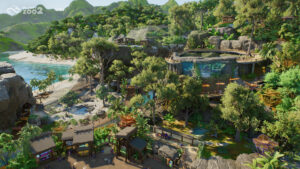


A couple of days ago, I was invited to get a hands-on look at Planet Zoo 2, the newest game coming from the developer Frontier Developments, the ones behind Planet Coaster and Jurassic World Evolution.
The event-specific preview covered the first couple of tutorial levels, and then we got a chance to go all out in free play. Truth be told, I had never really played a Planet game before this, my only experience being the original RollerCoaster Tycoon, but seeing the game in operation was extremely impressive, to say the least.

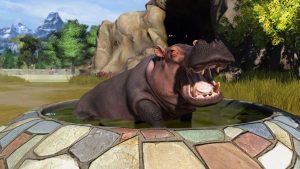
The first level I was loaded into was a part of the new wildlife sanctuary feature, where animals in zoos can be released back into their natural habitats. Starting off, I was actually in a first-person body, which was surprising enough, before I got into a vehicle and was able to drive wherever I wanted all over the sanctuary. The tutorial consisted of me driving around and taking pictures of the local Hippos and Zebras before taking me out of the action and into the editor.
Suddenly, I had a mission to build a home for incoming giraffes. While it may not look like it, players will have complete creative freedom to design the entire reservation to their and the animals’ liking. That’s a big point in Planet Zoo 2: the animals matter; countless meters and stats depict what the animals don’t like and do like, going so far as needing their native flora to actually be happy.
“Huge mountains and deep valleys are completely possible in Planet Zoo 2, and possibly even more that I didn’t even get the chance to use.”
Once the giraffes were safely released into the sanctuary, after a bit of terraforming and bulldozing, I was sent off into two fully built-up zoos to help out, both highlighting the new aviaries and fully aquatic animals of Planet Zoo 2. In this zoo, I was sent off to help with the release of a shoebill, those cool but creepy birds with the massive beak. While the base of its aviary was already completed, my part started with building a net over its enclosure, another very cool new feature in Planet Zoo 2.

The net itself can be fully customised with whatever material or colour you desire, but the cool part is that when you click, the game automatically simulates how the net would flow over the posts already put up and puts down a net that would match real-world physics. After that, all I had to do was adopt the Shoebill, hire a new keeper to attend to its needs and make sure it had all it needed in the food and enrichment zones to keep it happy.
After the zookeeper gave me her nod of approval, I was headed off again up to the Fjords of Scandinavia to help out an aquatic zoo. My first task here was to diagnose why a manatee was acting weird and then heal it, which I did with the help of the resident behavioural scientist and a recently hired (by me) veterinarian.
As soon as the big softy was all healed up, I was tasked with finishing up another enclosure, but this time for fish. Aquatic enclosures work entirely differently than land ones. The main difference is the water; players will have to install filtration systems exclusive to those enclosures, connect them into the Zoo’s power grid, and then check if the temperature is in the right zone for the animals. In my preview, I even had to switch the salinity level to match the ocean-going habitat of the fish we were showing off.

I finished up with the regular tutorials at this point, so I was finally allowed into the sandbox experience of the game. The first thing that I noticed was that literally everything in Planet Zoo 2 is customizable; I would accidentally click on a decoration and find that it had a dozen or so options to adjust how it looked. But aside from that, I immediately went into build mode, using the terraforming tool to make a small above-ground enclosed valley, in hopes of making a snazzy-looking aquarium.
What I found in this venture was that I am nowhere near as architecturally skilled as I once thought, but also that the tools are so in-depth that I could basically do whatever I wanted to with them. Huge mountains and deep valleys are completely possible in Planet Zoo 2, and possibly even more that I didn’t even get the chance to use.
“The first thing that I noticed was that literally everything in Planet Zoo 2 is customizable…”
While my project was eventually deemed a failure by me, I did have some fun decorating my pit with coral, adding water, and a walkable path with a window around the whole thing for visitors to enjoy. After that, I decided to take a look at another of the highlighted features Planet Zoo 2 offers: blueprints.

This mechanic make sit possible for anyone to have great-looking builds in the game without putting a ton of effort in; just click and place. And they work flawlessly; all I had to do was select one and put it down, and it was done. The best part was seeing the sea turtles I adopted have a good home. While the blueprints in this event-specific preview consisted of a couple of designs made by the devs, when Planet Zoo 2 releases fully, they plan to have an entire community of players posting their builds online for everyone to enjoy.
Planet Zoo 2 is set for release on October 13th, 2026 on PlayStation 5, XBOX Series X|S, and PC. Anyone who would like to know more about the newest game in a long line of great simulation games can visit the Planet Zoo 2 website.